Hand-Drawn Leaf Clipart and Floral Flower Art
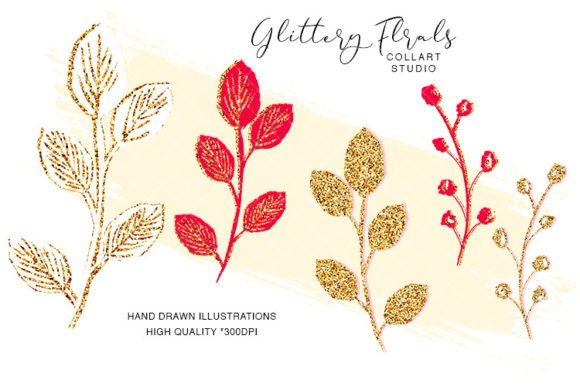
When you hold a set of original, hand-painted botanical elements in your hands—digitally speaking—the feeling is different from using stock graphics. This collection of leaf clipart and floral decorations offers five separate PNG images created by Collart Studio. Each piece is an actual painting, scanned at 300 dpi, with the largest files reaching about 3000x3000 pixels. The transparent backgrounds let you place delicate fern fronds, soft flower silhouettes, and layered foliage over any surface without a white box getting in the way.
People come to botanical clipart with very different goals. A hobbyist may want to print stickers for a journal spread, while a stationery designer needs elements that will look crisp on a physical invitation suite. A blogger might chase a certain aesthetic for a website header, and a fabric pattern maker needs enough resolution to scale a layout seamlessly. Recognizing these differences helps you understand why the same five images can feel like a tiny creative studio in a folder.
What Makes Hand-Drawn Botanical Art Different
Unlike vector icons built from perfect symmetrical shapes, a hand-drawn flower or leaf carries irregular brush strokes, slight paint bleeds, and organic edge variation. Those imperfections feel intentional and warm. Collart Studio uses traditional watercolor or ink techniques before digitizing the artwork, so you get the subtle granulation of pigment that a purely digital render rarely mimics. This leaf clipart set doesn't try to be a huge all-purpose bundle; instead, it offers a compact selection where each piece is thoughtfully composed.
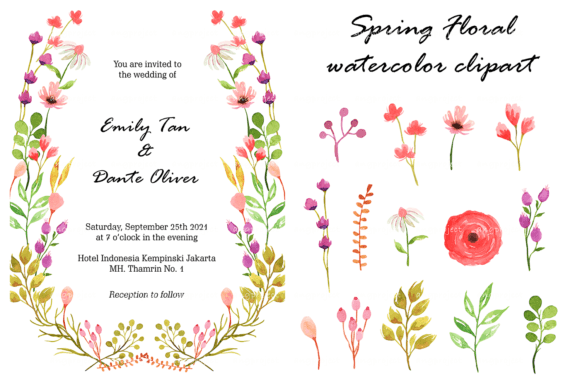
For a digital scrapbooker, that translates into embellishments that look like pressed botanical specimens rather than clipart icons. For an invitation designer, the same floral decorations can sit next to metallic foil text without feeling mass-produced. The PNG format preserves every fine detail against any backdrop, which matters when you want to layer greenery behind a monogram or create a faded watercolor border for a wedding program.
For the Planner Sticker Creator and Paper Crafter
If you make planner stickers or decoupage projects, you likely care about edge quality and print consistency. At 300 dpi and up to 8x8 inches, these flower elements let you shrink them down to half-inch decals without sacrificing clarity. You can print them on matte sticker paper, kiss-cut them with a digital cutter, and still see the nuanced veining in each leaf. Because the images are separate files, you aren't locked into a single composition—you can rearrange a sprig of greenery next to a loose bloom, then change your mind and use only the foliage for a minimalist kit.
The same creator might also use the floral decorations as pattern seeds. By repeating a single leaf across a canvas, you can generate a custom wrapping paper or a background for a handmade card. The large pixel dimensions give you room to rotate, mirror, or slightly distort elements without pixels breaking apart. This flexibility matters for crafters who sell physical sticker sheets or include digital downloads in their own kits; the original artwork license helps maintain a unique product line instead of reusing the same generic roses everyone else uses.
For the Small Business Owner and Brand Designer
Brand identity often lives in the details. A café owner designing a loyalty card, a soap maker laying out product labels, or a freelancer refreshing a logo mark might all look at floral decorations through a different lens: commercial longevity. Here, original hand-drawn art avoids legal gray areas that can come with sourcing clipart from unknown origins. Because Collart Studio creates the artwork, you have a clear chain of authorship, which matters if you're building a brand around authentic touchpoints.
Speed and quality also intersect. A single leaf clipart element can become a watermark on a website, a spot illustration on a packaging insert, or a social media template accent. Since the files are high-resolution PNGs, you can drop them into Canva, Photoshop, or even Word without extra conversion steps. A business owner without graphic design experience can still achieve a polished look because the art already carries texture and depth—there's less need to layer filters or effects to make it feel high-end. Meanwhile, a professional designer might use the flower pieces as a starting point, recoloring them or blending them into larger illustrations, knowing the base quality holds up under manipulation.
For the Educator and Content Creator
In teaching resources, worksheets, or blog posts, visuals need to do two jobs: explain and engage. A botany unit might use these leaf illustrations as identification cards, where the hand-painted style feels closer to a field journal than a sterile diagram. An online course creator can weave the floral decorations into slide decks or workbooks, adding a gentle, organic rhythm without distracting from the content. Since the PNGs are separate, you can keep a consistent motif—say, a fern-like leaf used as a section divider—and maintain visual coherence across multiple materials.
For bloggers and content marketers, the same flower clipart can serve as a featured image accent that makes a post more pinnable on Pinterest. The rich watercolor texture tends to photograph well on screens, creating thumbnail contrast against flat UI elements. And because the files aren't overly numerous, a non-designer doesn't feel overwhelmed choosing among hundreds of options; a small, intentional set encourages quicker decision-making, which matters when you're preparing weekly content on a tight schedule.
Understanding Quality and Technical Needs
Collart Studio provides these images at 300 dpi, which is the standard for professional printing. The approximate largest dimensions of 3000x3000 pixels mean you can print up to 8x8 inches at full resolution without interpolation. For a printable invitation suite, that lets you place a single bloom as a hero element on a 5x7 card and still have room to bleed. For web design, you'll likely scale down, which only sharpens the appearance. The PNG format preserves transparency, so you can place a delicate flower over a colored block, a photo, or a textured paper background with no background halo—something JPEG cannot offer.
Different users prioritize different quality markers. A scrapbooker might care most about how the inkjet print looks on textured cardstock; the watercolor variation actually masks minor print banding better than flat vector colors. A pattern designer importing the leaf clipart into a repeating tile cares about seamless edges and resolution headroom for large-scale fabric prints. A digital planner user cares about how the images look on a tablet screen at different zoom levels. The hand-drawn nature helps here too: slight imperfections make on-screen display feel more tangible, like real paper ephemera.
Practical Projects That Bring the Art to Life
Instead of vague inspiration, consider the actual workflow. You unzip five files. One might be a sprig with several leaves, another a standalone bloom, another a cluster of small filler flowers. A beginner can open a blank document, place a leaf in the corner of a thank-you card template, type text next to it, and print. A more experienced creator might use the same flower to build a seamless pattern in Procreate, adjusting hue and opacity to create a subtle tonal background for a website. A stationery business owner could combine two elements to design a save-the-date magnet, knowing the 3000px width gives enough detail for a fridge-sized view.
For DIY projects like decoupage, you can print the florals onto thin paper, cut loosely, and apply to wooden trays or glass jars with decoupage medium. The translucent watercolor areas allow the surface grain to show through, blending the art into the object. For planner stickers, printing on clear sticker paper lets the leafy parts sit directly on a calendar grid without a white rectangle shape. The versatility of a small, well-made set often outperforms a massive bundle of lower-quality images because each piece earns its place.
How Different Goals Shape Your Evaluation
If you measure value by hours saved, these hand-drawn elements shortcut the process of scanning your own botanical paintings or commissioning custom art. A beginner benefits from the immediate usability: no tracing, no cleaning up scanned sketches. A professional benefits from the artistic integrity of original work that can be licensed and used in client projects without sourcing anxiety. A hobbyist benefits from the emotional lift of working with something that feels more like an art supply than a generic download.
Cost and quality often trade off, but here the small set focuses on what really matters. Instead of 500 repetitive icons, you get five intentional, scalable artworks. For a freelancer creating invitation suites, that might mean the difference between a product that looks handmade versus mass-produced. For a blogger, it might mean a consistent botanical theme that strengthens visual identity over months of posts. The same leaf clipart can reappear in a sidebar graphic, a footer detail, and a pin design, becoming a quiet signature element. That long-term usefulness feels more valuable than a one-off purchase of trending templates that date quickly.
Reliability also comes from file simplicity. PNG files open on virtually any device, require no font installations or software subscriptions, and are small enough to store in cloud folders without bloating your drive. The 300 dpi standard means you won't accidentally send low-resolution art to a print shop. For a teacher assembling last-minute classroom decorations or a small shop owner printing tags before a pop-up market, that reliability reduces friction and prevents rework.
Ultimately, whether you see this set as raw material for a product line, a styling tool for content, or simply a beautiful digital supply for personal crafting, the common thread is originality paired with practical resolution. The leaves and flowers don't pretend to be flawless studio illustrations, and that's the point. They carry the human hand, and when you place them into your own work, that quality transfers. The art becomes part of your voice, not a generic filler.