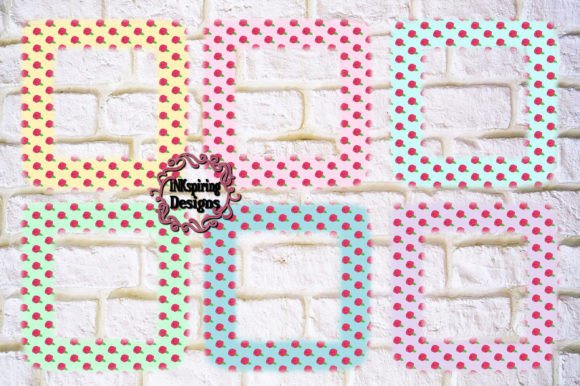
Unlocking Creative Control with Rosebud Floral Frames PNG
Designing for print or digital media often begins with a single, well-chosen element. The Rosebud Floral Frames PNG collection gives you exactly that — a set of six high-resolution, transparent-background frames that fit seamlessly into everything from wedding stationery to social media branding. Unlike a subscription service or a bulky design template, you receive a digital file only, putting full control in your hands immediately. Each frame arrives as a 3600 x 3600 pixel PNG at 12″ x 12″ and 300 DPI, ready to blend into your printing projects without degrading quality. That simple combination of size, resolution, and format mirrors a wider shift toward lean, asset-based creative workflows where users demand flexibility, not friction.
Why Floral PNG Frames Are Thriving in a Personalized World
Walk through any modern design marketplace and one thing becomes clear: people no longer want off-the-shelf visuals. The rise of print-on-demand services, customizable invitations, and small-batch packaging has pushed digital assets like Rosebud floral frames into everyday use. A transparent PNG frame makes it easy to overlay a child’s portrait, a couple’s initials, or a product shot without wrestling with clipping paths. The six distinct color variations included — spanning from classic blush to deep botanical greens — let you match the frame to a brand palette, a wedding theme, or a seasonal campaign in minutes.
This personalization trend isn’t just about aesthetics. It echoes a deeper expectation among buyers and creators: that tools should bend to their vision, not the other way around. When you know you’ll receive a digital file only, you sidestep shipping delays and physical inventory. For graphic designers, social media managers, and small business owners, that immediacy translates directly into faster project turnaround and the ability to mock up multiple versions before committing to a final layout.
What You Actually Get: 6 High-Resolution PNG Frames
Let’s break down the technical package because it directly impacts how you can use the product. The Rosebud Floral Frames PNG download includes six individual files. Each one measures 3600 × 3600 pixels, which at 300 DPI produces a crisp 12″ × 12″ print. That size covers typical square formats for album covers, tray liners, cushion designs, and scrapbook layouts. Because they are PNG files, the backgrounds are already transparent. You won’t need to remove a white box or fuss with extraction — just place, resize, and layer.
Having all six colors upfront means you aren’t guessing whether “mauve” or “sage” will work with your photo. You can test them side by side in your design software. The files aren't embedded in a cumbersome template; they are clean, standalone elements you can use across Adobe Photoshop, Canva, Procreate, or even simple word processors that accept raster graphics. This raw asset approach appeals to anyone who has spent hours undoing someone else’s design decisions just to get to a basic element.
From Digital File to Tangible Keepsake
The 300 DPI resolution deserves a closer look. A common pitfall with online floral graphics is that they look fine on screen but pixelate when printed at standard sizes. These rosebud frames were built to avoid that exact problem. When you send a 12″ × 12″ file at 300 DPI to a home printer or a commercial press, the petal details remain sharp, and the line art doesn’t shudder into jagged edges. This makes them suitable for projects where texture and precision matter, like vellum overlays for formal invitations or large-format canvas prints for a nursery wall.
Many users blend these PNG frames with a plain SVG or vector background to create layered compositions that feel entirely bespoke. You could drop a soft watercolor wash behind the roses, position a monogram in the center, and export at exactly the right dimensions for a letterpress wedding suite. Because the PNG format preserves the delicate edges of the blooms, the frame integrates with hand-drawn elements or typography without an obvious cutout look. The result feels more like an intentional illustration than a tacked-on border.
How Creators Use Rosebud Frames in Real Projects
Observing how people actually incorporate these floral frames reveals their versatility. A bakery owner uses the cream-toned frame to wrap around a logo for custom cookie packaging. A crafting blogger layers the soft coral variant over a time-lapse video thumbnail, boosting a cohesive brand look across Pinterest and YouTube. A freelance educator builds worksheets with a delicate border, turning a plain vocabulary list into something that feels handcrafted. In each case, the heavy lifting of drawing a balanced rosebud wreath is done, and the creator gets to focus on the personal touch.
It’s also common to see these files used in hybrid digital-print workflows. For instance, a marketer might design a lead magnet in Canva, using the frame as a consistent motif on every page, then export a single-page version as a print-ready thank-you card. Keeping the frame as a digital file only means no excess physical waste, and you can reuse the same asset across dozens of campaigns without additional cost or degradation.
The Practical Edge of Large Square Dimensions
At 12″ × 12″, the frames arrive at a size that fits many pre-made blanks — think scrapbook paper, record jacket templates, and even certain tile sublimation molds. Because the dimensions are square and generous, you can also crop into the design. Need a rectangular frame? Take the square file and slice it into top and bottom strips, or isolate a corner flourish for a smaller logo badge. The resolution holds up under cropping, giving you effectively multiple framing options from a single file.
This scalability addresses a common complaint about smaller clip art sets: the moment you enlarge them for a poster or a wide banner, the flaws appear. A 3600-pixel canvas gives you room to maneuver. Even if you downscale the frame for an online ad, the anti-aliasing remains clean. This worry-free resizing is one reason people who have been burned by low-resolution bundles start gravitating toward clearly specified dimensions and DPI figures before they click purchase.
Building on the Asset: Adding SVG, Photos, and Text
When you work with a transparent PNG, the design process becomes additive. Load the rosebud frame, then place your personal photo behind it and set the frame to screen or normal blending. Immediately you have a framed portrait that works for Mother’s Day gifts, pet memorials, or employee spotlights. Adding a plain SVG silhouette in the center — perhaps a simple leaf or a geometric monogram — creates a logo-like emblem without requiring vector illustration skills. Then layer text in a complementary serif, and the whole layout looks deliberate rather than thrown together.
For those who enjoy mixing media, these frames also pair well with textured backgrounds. Overlay the frame on a linen or watercolor paper texture, and the rosebuds take on a tactile quality that can fool the eye on a screen or on textured cardstock. Because you can tweak opacity and blend modes, the same six PNG files can produce dramatically different moods, from vintage sepia to bright modern folk. That transformative range makes it easier to justify a digital asset; it’s not a one-and-done decoration but a reusable building block.
Why a “Digital File Only” Model Makes Sense Now
Consumer habits have shifted noticeably toward digital-first purchasing for craft and design resources. Instant delivery meets the expectation that a creative spark shouldn’t be cooled by waiting for the mail. For professionals coordinating across time zones, the digital file only model means a team member in another country can access the same high-quality assets without shipping costs or customs forms. It also aligns with sustainability-minded workflows — no plastic packaging, no excess printing, just the exact files needed for the job.
Storage and reuse further sharpen the value. Unlike a physical stencil or a single-use sticker sheet, these PNG frames can live in a well-organized creative cloud folder. Next year, when a different client needs a romantic floral touch, the same rosebud assets are ready to be recolored (using hue adjustments) or combined with new typography trends. They age well because the underlying artwork — classic roses with gentle curves — doesn’t chase a fleeting graphic fad.
Matching the Frame Colors to Your Palette
The six included colors give you a head start on color harmony. While specifics vary by set, you usually find tones that align with popular wedding palettes, nursery décor, and feminine branding. Using the eyedropper tool in your design software, you can sample a rose petal and bring that exact shade into your text or background elements to tie the composition together. For the color-experimentalist, a quick pass through a hue/saturation adjustment layer turns the pink version into a deep burgundy or a sun-bleached amber, extending the palette well beyond the original six.
It’s worth noting that because the artwork is delivered as a flattened PNG, complex recolorization is best done with adjustment layers or blending rather than trying to isolate petals individually. However, for most users, the beauty of pre-colored frames is precisely that they don’t need heavy editing — they work straight out of the folder. You pick the mood and move on to the more interesting parts of your design.
Realistic Advice for Print-Ready Projects
To get the most out of your Rosebud Floral Frames PNG files, always check your canvas settings before dropping them into a layout. Confirm that your document DPI matches the 300 DPI of the frame; dropping a high-resolution asset into a 72 DPI file can lead to surprising scaling behavior. If you plan to print professionally at a different size, like 8″ × 8″ or an A4 sheet with the frame placed as a decorative window, use your software’s resize function while constraining proportions. Because the source file is square, you may want to set up your design with margins that accommodate that ratio gracefully.
Also, take a moment to view the frame at 100% zoom before final export. Sometimes subtle petals near the edge can appear fine on a full-screen view but get trimmed if you add an aggressive bleed. Adding a small inner margin — even 0.25 inches — can protect the floral details during cutting. These small habits separate a rushed print job from a polished keepsake.
Expanding Beyond the Frame: Adding Other Elements
One of the more enjoyable parts of working with isolated floral graphics is building an entire scene around them. After you’ve placed the frame and your central photo or SVG, consider sprinkling a few loose petals, a delicate butterfly silhouette, or a hand-lettered date bracket. Since you’re not locked into a fixed template, the layout can breathe. A birth announcement, for example, might use the coral rosebud frame as a gentle halo around the baby’s name, while a few tiny stars balance the visual weight in the opposite corner.
For those who create social media templates for others to use, these frames become particularly valuable. You can assemble six branded image backgrounds — one per frame color — and offer them as a cohesive set. The consistent botanical theme ties the posts together, while the color variations give enough flexibility for different types of announcements or quotes. It’s a simple way to build visual equity without commissioning custom illustrations from scratch.
A Creative Asset That Adapts With Your Needs
The digital design space has moved toward modular, high-quality components that respect the user’s own skill and vision. Rosebud Floral Frames PNG products embody that shift. They don’t force you into a preset style; they supply the ornate border and let you decide what lives inside. Whether you’re running a stationery studio, crafting gifts for family, or refreshing a blog’s visual identity, the combination of generous pixel dimensions, print-ready resolution, and true transparency gives you a dependable creative partner, not a decorative distraction. Each time you open those six PNG files, you’re not just using a frame — you’re starting a design that is genuinely yours.